Building a Modern Detection Pipeline with ContentOps
From empty repo to green conformance run: configure ContentOps for Microsoft Sentinel and Microsoft Defender XDR with keyless OIDC auth.
If you manage detection content across Microsoft Sentinel and Microsoft Defender XDR, you have probably been here: a rule breaks silently after someone edits a parser in the portal. A colleague adds a watchlist no one else knows about. An analytic stops firing and by the time you notice, nobody can tell you what changed or when.
That is exactly why I built ContentOps.
ContentOps is an open-source Python CLI and GitHub Actions pipeline that treats every Microsoft Sentinel analytic, hunting query, watchlist, parser, data connector and Microsoft Defender XDR custom detection as code. Rules are versioned, reviewed, tested and deployed automatically. No more unreviewed portal edits. No more “it was working last week” without a diff. The tool is Apache-2.0 licensed and available at github.com/SecM8/ContentOps.
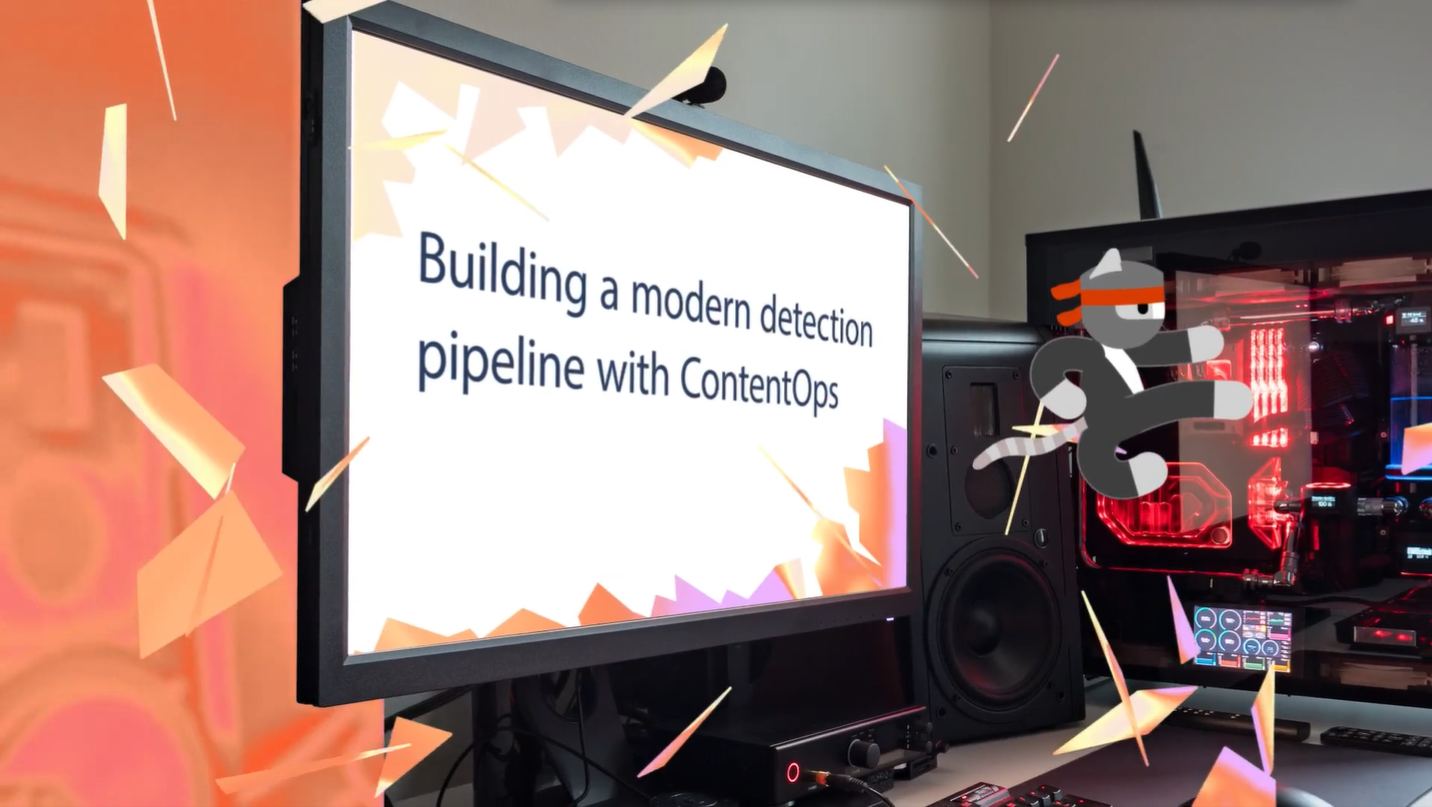
I sat down with Heike Ritter on the Virtual Ninja Show to walk through the setup live. I built ContentOps and she asked all the right questions:
This guide is for detection engineers, SOC platform engineers and security teams that already run Microsoft Sentinel or Microsoft Defender XDR and are ready to bring the same discipline to detection content that you already apply to application code. Plan for about an hour the first time, mostly for Azure permissions and OIDC wiring. After that, every rule change is a pull request.
We will configure ContentOps together from a fresh private deployment repo to a passing conformance run and a first deploy. By the end you will have:
- a private ContentOps deployment repo
- GitHub Actions authenticated to Azure through OIDC, with no Azure client secret
- a validated tenant configuration
- conformance checks across L1–L7 with all applicable checks PASS and non-applicable checks SKIP
- a detection baseline collected from your live tenant
- a working deploy path for Microsoft Sentinel and Microsoft Defender XDR content
What you get
- Security content as reviewable YAML across six asset kinds: analytics, hunting queries, Microsoft Defender XDR custom detections, watchlists, parsers and data connectors (
sentinel_analytic,sentinel_hunting,defender_custom_detection,sentinel_watchlist,sentinel_parser,sentinel_data_connector). The last three go beyond traditional “detection” but belong in the same lifecycle. A broken parser silently kills analytics. A misconfigured connector stops data flowing in - Pull-request gates: schema validation, KQL + metadata lint and a local apply-plan preview before merge
- Keyless Azure auth: GitHub→Azure OIDC federation, no Azure client secret stored or rotated
conformance(L1–L7): a read-only pre-flight that proves installation, authentication, RBAC, Graph permissions and tenant reachability before anything is mutated- Drift detection, alert telemetry, MITRE ATT&CK coverage and a hash-chained audit trail
- Tenant-specific configuration stays out of git. CI writes it from
TENANT_CONFIG_YAMLat runtime
Architecture
We run a private deployment repo based on the public tool mirror. The tool flows down to us. Our detections and tenant config never flow back to the public mirror.
%%{init: {'theme': 'base', 'themeVariables': {'primaryColor': '#0d2847', 'primaryTextColor': '#e2e8f0', 'primaryBorderColor': '#10b981', 'lineColor': '#475569', 'secondaryColor': '#1e3a5f', 'edgeLabelBackground': '#0d2847', 'tertiaryColor': '#162d47', 'clusterBkg': '#162d47', 'clusterBorder': '#334155'}}}%%
flowchart LR
    subgraph pub ["SecM8 (public mirror)"]
        PUB[("SecM8 / ContentOps\ntool · templates · docs")]
    end
    subgraph prv ["your private repo"]
        FORK[("org / detections\ndetections/ · config/")]
    end
    subgraph tnt ["Azure tenant"]
        SEN["Microsoft Sentinel"]
        DEF["Defender XDR"]
    end

    PUB -->|"upstream pull\ntool updates only"| FORK
    FORK -->|"OIDC + ARM"| SEN
    FORK -->|"OIDC + Graph"| DEF

    classDef repo fill:#0d2847,stroke:#10b981,stroke-width:2px,color:#e2e8f0
    classDef svc fill:#1e3a5f,stroke:#2563a8,stroke-width:1px,color:#e2e8f0
    class PUB,FORK repo
    class SEN,DEF svc
    style pub fill:#162d47,stroke:#10b981,stroke-width:1px,color:#94a3b8
    style prv fill:#0d2847,stroke:#10b981,stroke-width:2px,color:#94a3b8
    style tnt fill:#0f2240,stroke:#2563a8,stroke-width:1px,color:#94a3b8
The mirror ships the tool, templates, samples and docs only. We bring our own detections under detections/<kind>/. They live only in our private repo. Updates to the tool arrive by pulling upstream. We cover that at the end.
The per-change flow is a standard CI/CD loop:
%%{init: {'theme': 'base', 'themeVariables': {'primaryColor': '#0d2847', 'primaryTextColor': '#e2e8f0', 'primaryBorderColor': '#10b981', 'lineColor': '#475569', 'edgeLabelBackground': '#091f35', 'tertiaryColor': '#091f35'}}}%%
flowchart TD
    A(["Author / collect"]):::human
    V["validate\nlint · plan preview"]:::auto
    R(["Review PR"]):::human
    M["Merge → main"]:::gate

    subgraph dep ["deploy.yml"]
        D["apply\ncreate · update · skip"]:::auto
    end

    subgraph ten ["Azure tenant"]
        S[("Sentinel +\nDefender XDR")]:::cloud
    end

    subgraph sched ["Scheduled"]
        DR["drift.yml · daily\ncompare tenant ↔ repo"]:::watch
        AL["alerts-report.yml · daily\nTP · FP · MTTR"]:::watch
    end

    A --> V --> R --> M --> D --> S
    S --> DR & AL
    DR -.-> A

    classDef human fill:#1e3a5f,stroke:#10b981,stroke-width:2px,color:#e2e8f0
    classDef auto  fill:#0d2847,stroke:#475569,stroke-width:1px,color:#94a3b8
    classDef gate  fill:#0d2847,stroke:#10b981,stroke-width:2px,color:#10b981,font-weight:bold
    classDef cloud fill:#091f35,stroke:#2563a8,stroke-width:2px,color:#e2e8f0
    classDef watch fill:#091f35,stroke:#475569,stroke-width:1px,color:#94a3b8
    style dep fill:#111827,stroke:#334155,stroke-width:1px,color:#64748b
    style ten fill:#0a1628,stroke:#2563a8,stroke-width:1px,color:#64748b
    style sched fill:#0a1628,stroke:#334155,stroke-width:1px,color:#64748b
Prerequisites
Before we start, make sure we have:
- An Entra ID tenant with at least one Microsoft Sentinel workspace, Microsoft Defender XDR, or both
- Rights to create an App Registration and assign permissions on the Microsoft Sentinel workspace
- A private GitHub repository for our deployment copy
- Python 3.12 for the local CLI
- The GitHub CLI (
gh) for triggering workflows from the terminal
This walkthrough covers a single-tenant setup. Multi-tenant works by using a multi-tenant app registration that each customer approves in their own tenant, with the client secret living in an Azure Key Vault in your own tenant, accessed by the pipeline via federated credential and rotated automatically. I have done a POC of this for MSSP scenarios and a dedicated post will follow once the architecture is solid.
Day-1: Setup
Configure authentication, permissions and conformance checks once. Each section builds on the previous. Complete them in order.
Get the repository
We clone the public mirror, then rewire remotes so origin is our private repo and upstream is the read-only mirror. Create the private repo on GitHub first, then:
1
2
3
4
5
6
git clone https://github.com/SecM8/ContentOps.git contentops
cd contentops
git remote rename origin upstream
git remote add origin <your-private-repo-url>
git remote set-url --push upstream DISABLED   # never push to the public mirror
git push -u origin main
Then install the CLI locally:
1
2
3
4
python -m venv .venv
# Windows: .\.venv\Scripts\Activate.ps1   |   *nix: source .venv/bin/activate
pip install -e .            # editable install — CLI runs from this directory
contentops --version        # prints "ContentOps powered by SecM8 v..."
The venv must be active whenever we run contentops commands. If we open a new terminal later, re-activate it before continuing.
Local catalog
ContentOps ships a code-derived catalog of the CLI surface, workflows, handlers, lint rules and asset taxonomy:
1
2
contentops catalog regenerate
contentops catalog check
regenerate writes docs/reference/generated-catalog.md. check exits non-zero if the committed catalog is stale. It is a documentation drift gate, not a web server. No Azure credentials are needed.
Local auth for CLI:
In CI, OIDC handles auth automatically. Locally we have two options:
| Method | When to use |
|---|---|
az login | Interactive sessions. Authenticates as your own Entra account. Run once, then the CLI caches the token. Already required for contentops doctor. |
.env file | Non-interactive or devcontainer use. Copy .env.example to .env and set AZURE_TENANT_ID, AZURE_CLIENT_ID and AZURE_CLIENT_SECRET. The .env file is gitignored. CI remains keyless through OIDC. |
For this walkthrough we use az login. Switch to .env if we run into multi-user devcontainers or want to test with the exact service-principal identity that CI uses.
Entra ID app registration
This guide uses a single App Registration: one identity for all environments. That is the right starting point. Read/write split is described at the end of this step if you want separation of duties later.
In the Azure portal, go to Entra ID → App registrations → New registration. Name it (e.g.
contentops-prod), leave redirect URI blank and register. No client secret. Authentication uses OIDC in Step 3.Azure RBAC: on the Sentinel workspace’s resource group → Access control (IAM) → Add role assignment, assign both Microsoft Sentinel Contributor and Log Analytics Contributor. Sentinel Contributor covers analytics, watchlists and data connectors. Log Analytics Contributor is required for hunting queries and parsers. The Sentinel role alone will 403 on those two.
Graph permissions: only needed if managing Microsoft Defender XDR custom detections. On the app go to API permissions → Add a permission → Microsoft Graph → Application permissions →
CustomDetection.ReadWrite.All, then Grant admin consent. This requires an Entra Global Administrator or Privileged Role Administrator.
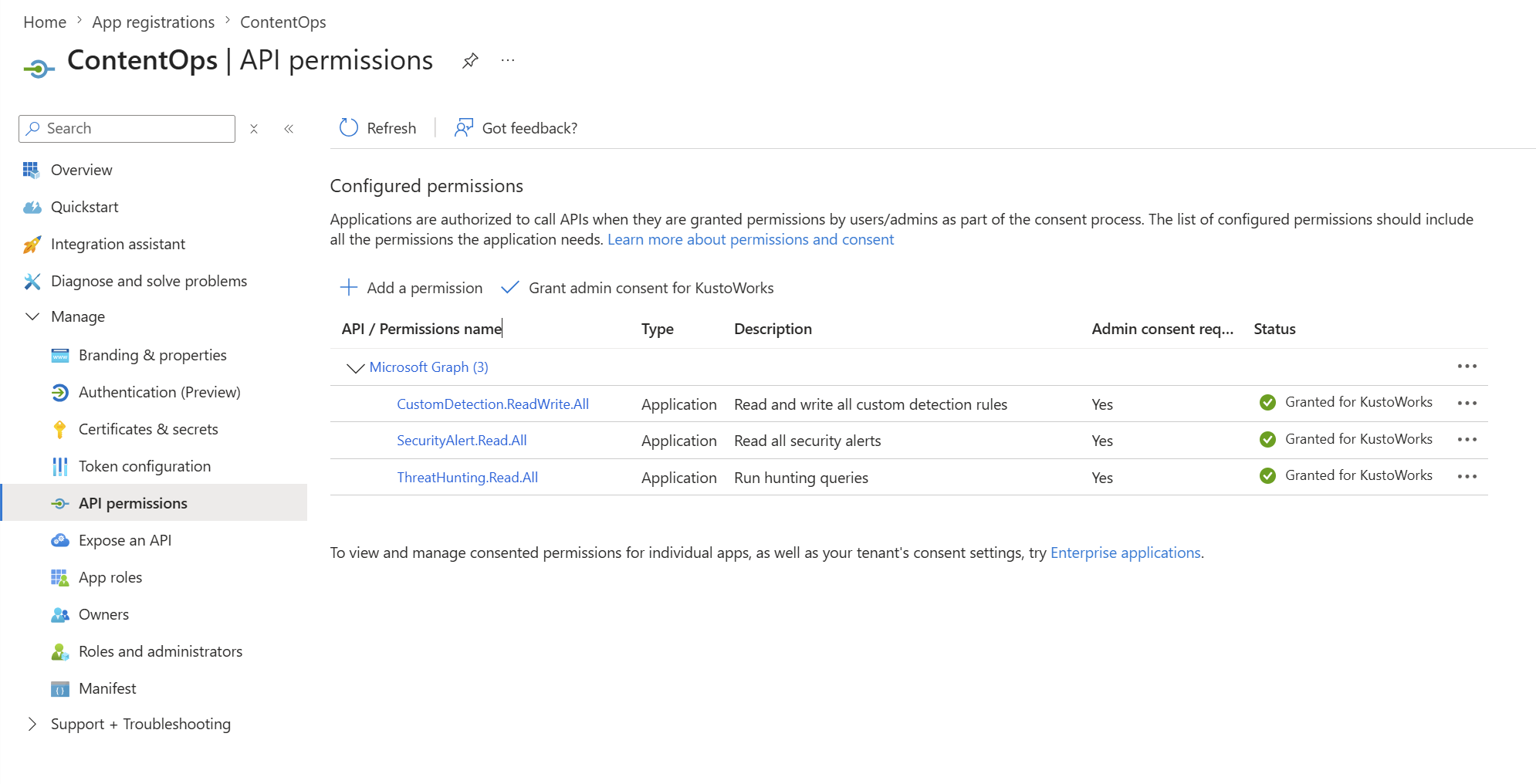 Application permissions with admin consent granted. The green check is what
 conformance L4 verifies.
Optional permissions (add only when you enable the feature):
| Permission | Grants | Needed by |
|---|---|---|
SecurityAlert.Read.All | Read alert telemetry | alerts-report.yml |
ThreatHunting.Read.All | Defender advanced hunting reads for live Defender schema refresh | kql-schemas-refresh.yml, contentops upstream check-defender-schema |
If you only use Microsoft Sentinel, disable Microsoft Defender XDR with
defender.enabled: falseintenant.ymland skip all Defender Graph permissions. The Sentinel-only path supports analytics, hunting queries, watchlists, parsers and data connectors.
ThreatHunting.Read.All is only for the Defender schema refresh path. If you do not grant it, disable Defender schema refresh in config/lint_strict.yml or rely on the committed tools/kql_strict/schemas_defender.json baseline.
Optional read/write split
For stronger separation of duties, ContentOps also supports two identities. The read identity runs in the automation environment: drift, collect, alerts and the scheduled conformance read leg, with Reader RBAC and no write Graph grants. The write identity runs in production and conformance: deploy and the conformance write leg, with Contributor RBAC and CustomDetection.ReadWrite.All. Each GitHub Environment sets its own AZURE_CLIENT_ID to point at the matching registration. In .contentops-conformance.yml use identity_mode: split, which is also the default if the key is absent.
OIDC federated credentials
No secret is stored for Azure. Instead of a client secret, Azure accepts a short-lived token issued by GitHub and exchanges it for an Azure access token. That is the OIDC federation: a trust relationship between GitHub and Azure where nothing needs to be stored or rotated. If you are new to OIDC, think of it as Azure trusting a specific GitHub workflow identity (repository and environment) instead of trusting a long-lived password.
First, create the GitHub Environments: in our private repo go to Settings → Environments → New environment. Create production, automation and conformance first. Add reporting if you will run the shipped report.yml and coverage.yml workflows and integration if you have a dedicated test workspace. The environments production, automation, conformance and integration each need a federated credential on the same App Registration. The reporting environment does not currently call Azure. No federated credential needed unless you extend the reporting workflows to query the tenant.
Then, for each Azure-calling environment, add a federated credential on the matching App Registration: Certificates & secrets → Federated credentials → Add credential → GitHub Actions deploying Azure resources:
| Field | Value |
|---|---|
| Issuer | https://token.actions.githubusercontent.com |
| Subject | repo:<org>/<repo>:environment:<environment-name> |
| Audience | api://AzureADTokenExchange |
<org> is our GitHub organisation name or personal username. <repo> is the private repo name.
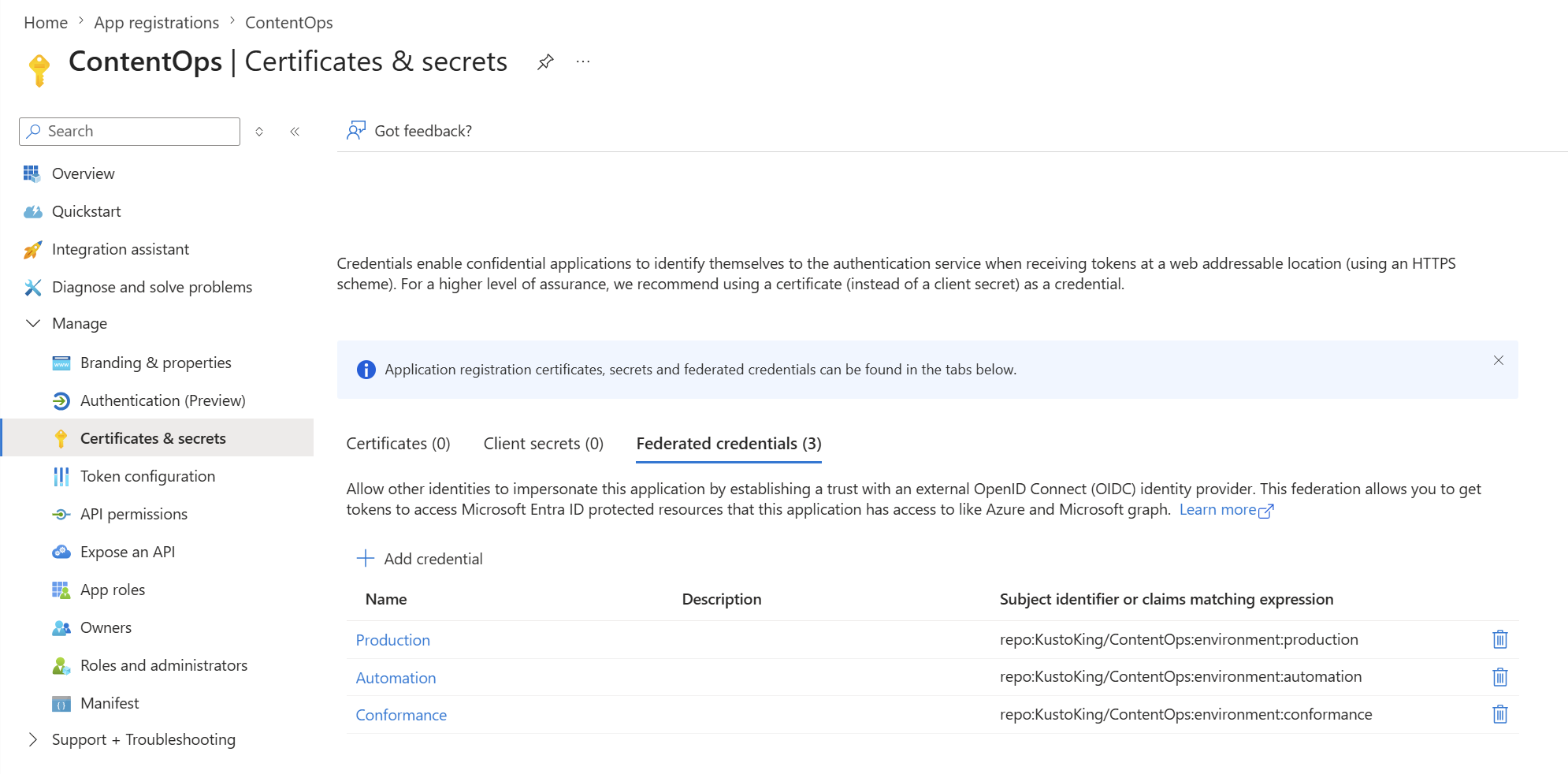 One credential per environment. The subject must match exactly.
ContentOps uses GitHub Environments to give each workflow a stable OIDC subject. In this single-registration setup, the Azure-calling environments all point to the same App Registration, but each still needs its own federated credential:
| Environment | Workflows | OIDC credential |
|---|---|---|
production | deploy, rollback, retry-failed, prune | same App Registration |
automation | drift, collect, alerts-report, status-refresh, silent-rules, lock-unlock, conformance (read) | same App Registration |
reporting | report, coverage | none (no Azure calls) |
conformance | conformance (write) | same App Registration |
integration | integration, integration-deploy, promote-to-integration, rollback/prune against a test workspace | same App Registration or a separate integration identity |
In a read/write split, place the automation credential on the read App Registration and the production / conformance credentials on the write App Registration.
The minimum for this walkthrough (conformance, collect baseline and first deploy) is production + automation + conformance. Create reporting for the weekly inventory and ATT&CK heatmap workflows. No Azure federated credential needed unless you extend those workflows to query Azure. integration is optional and only needed for teams with a dedicated test workspace.
A subject mismatch (wrong org/repo/environment, or a workflow with no
environment:) fails the Azure login step withAADSTS700213. Match the credential subject to theenvironment:line in the workflow.
Configure .contentops-conformance.yml
Create this file in the root of your private repo. It tells the conformance workflow what identity mode you are running and which OIDC subjects to validate. Without it, conformance defaults to split mode and expects a separate read identity. A single-registration setup will then fail the least-privilege checks because the automation leg has write-capable grants by design.
1
2
3
4
5
6
7
8
identity_mode: single

federated_credential_subjects:
  - "repo:<org>/<repo>:environment:production"
  - "repo:<org>/<repo>:environment:automation"
  - "repo:<org>/<repo>:environment:conformance"

github_repo: <org>/<repo>
Replace <org>/<repo> with your GitHub organisation and repo name. identity_mode: single tells conformance that all environments share one App Registration. The read leg still runs against automation but uses write-profile expectations instead of failing on shared permissions. The report labels this as identity=read (single-app).
federated_credential_subjects tells conformance which OIDC subjects must exist on the App Registration. github_repo tells the GitHub wiring checks which repository to inspect. Omit any environment you did not create.
Optional keys extend what conformance validates:
1
2
3
4
5
6
7
8
9
10
graph_app_roles:
  - CustomDetection.ReadWrite.All   # expected Graph application roles

github_required_credentials:        # checks secrets and variables
  - TENANT_CONFIG_YAML

github_required_checks:             # required CI status checks
  - pytest
  - actionlint
  - dco
GitHub configuration
In our private repo’s Settings → Secrets and variables → Actions we add:
- Variables tab:
AZURE_TENANT_IDandAZURE_CLIENT_IDas repository variables. With a single App Registration both values are the same across all environments. If you later move to a split read/write model, overrideAZURE_CLIENT_IDat the environment level under Settings → Environments → [environment name] → Variables to point each environment at the correct registration. - Secrets tab:
TENANT_CONFIG_YAML: openconfig/tenant.yml, copy the entire file contents and paste as the secret value. CI writes the file at job start. The file itself stays gitignored.
Then under Settings → Environments, add required reviewers to production if we want a manual gate before deploy runs.
Finally, Settings → Actions → General → Workflow permissions: enable “Allow GitHub Actions to create and approve pull requests”. ContentOps uses this so collect and drift can open PRs automatically. Keep branch protection and reviewer requirements in place so automation cannot silently deploy changes.
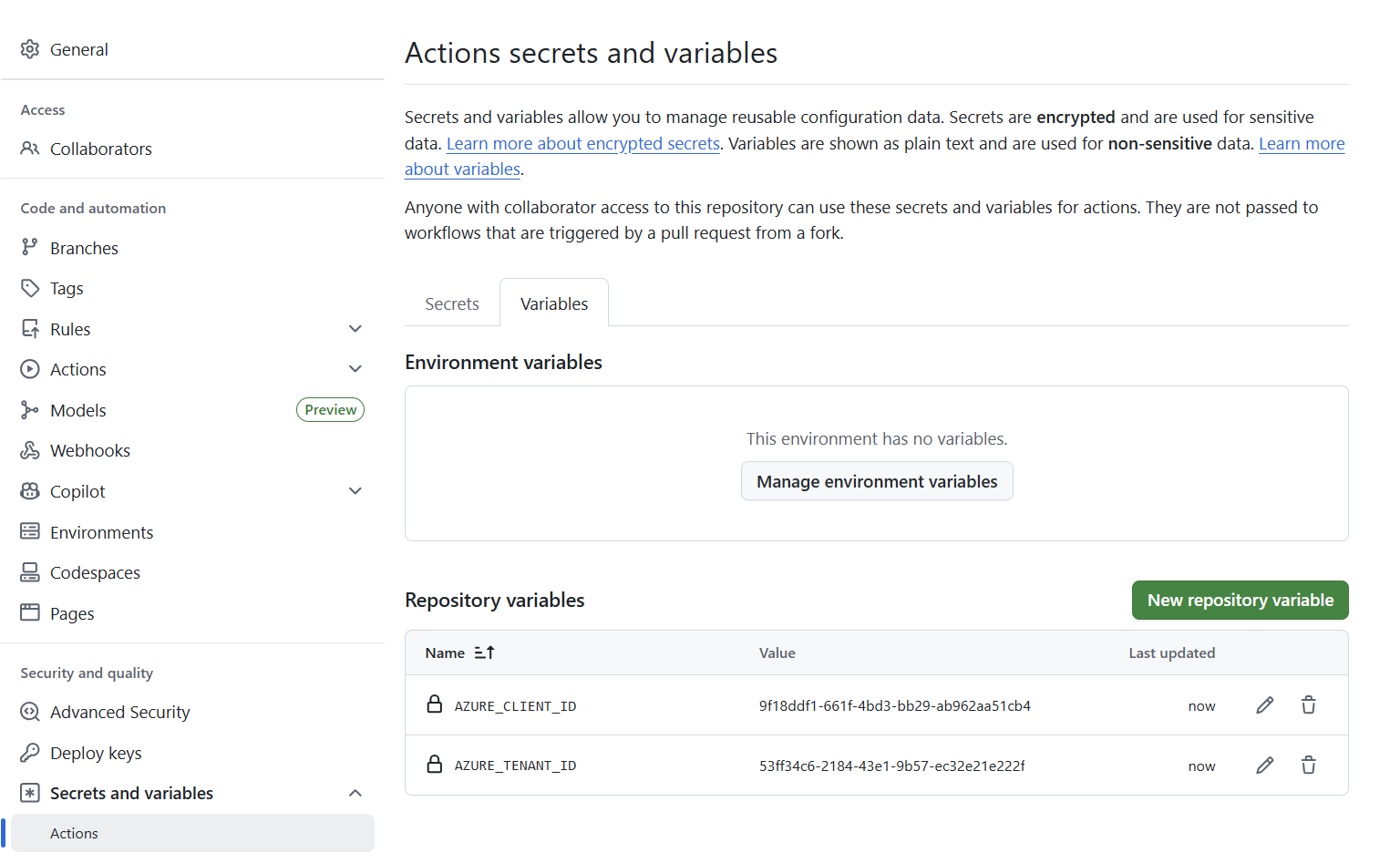 The subscription ID is read from
 tenant.yml, not stored as a variable.
Define tenant.yml
We copy the template and fill in our values. The real file is gitignored (git never tracks it). It carries tenant and subscription identifiers plus deployment safeguards. Keep it out of git so environment-specific configuration never leaks into the mirror or pull requests.
1
cp config/tenant.yml.example config/tenant.yml
1
2
3
4
5
6
7
8
9
10
11
12
13
14
15
16
17
18
19
20
21
22
23
24
25
26
27
28
29
30
31
32
tenant:
  name: production
  tenantId: "<entra-tenant-guid>"

  # Defender XDR custom detections (set enabled: false if unused)
  defender:
    enabled: true
    writeAllowed: true       # gates `apply`
    purgeAllowed: false      # gates bulk `prune`
    maxDelete: 25            # hard cap on per-run deletions

  sentinelWorkspaces:
    - role: prod             # label we choose, used in workflow inputs (-f role=prod)
      subscriptionId: "<subscription-guid>"
      resourceGroup: "rg-sentinel"
      workspaceName: "law-sentinel"
      location: westeurope
      writeAllowed: true
      purgeAllowed: false
      maxDelete: 25

  # Optional: alert ledger + retention
  alerts:
    enabled: true
    defenderLookbackDays: 30
    sentinelLookbackDays: 90
    ledgerRetentionDays: 90
    rollupRetentionDays: 365

  # Optional: committed report history retention
  reports:
    retentionDays: 365       # dated report snapshots to keep, 0 = keep all
The shape above is the minimum useful configuration. The repository template includes additional optional fields:
policy.scaffoldStrict, alert reconciliation controls (alerts.armOverlayDays,alerts.reexportDays,alerts.reconcile) and anintegration-role workspace entry for teams with a separate test workspace. Copyconfig/tenant.yml.exampleto see the full schema with inline comments.
The safeguard triple, writeAllowed / purgeAllowed / maxDelete, is our blast-radius control. Writes are gated by writeAllowed, bulk deletes need purgeAllowed: true and no single run can delete more than maxDelete objects. The effective limit is the minimum of the CLI flag, the workflow input and this file, so there is no way to accidentally delete more than we intended.
This is the file I always take a second look at before running anything. Get the tenantId, subscriptionId and workspaceName wrong here and every step after fails with a clear error, so it is worth being precise now.
Once we have filled in our values, we validate locally and then paste the same content into the TENANT_CONFIG_YAML secret:
1
contentops config validate
doctor and conformance
Before we touch CI, we run doctor locally to validate our environment end to end. Adding --matrix probes each handler against the live tenant so we know exactly what is wired before anything is deployed. If token_acquisition fails, run az login first. doctor uses the active az CLI session when environment variables are not set:
1
contentops doctor --matrix
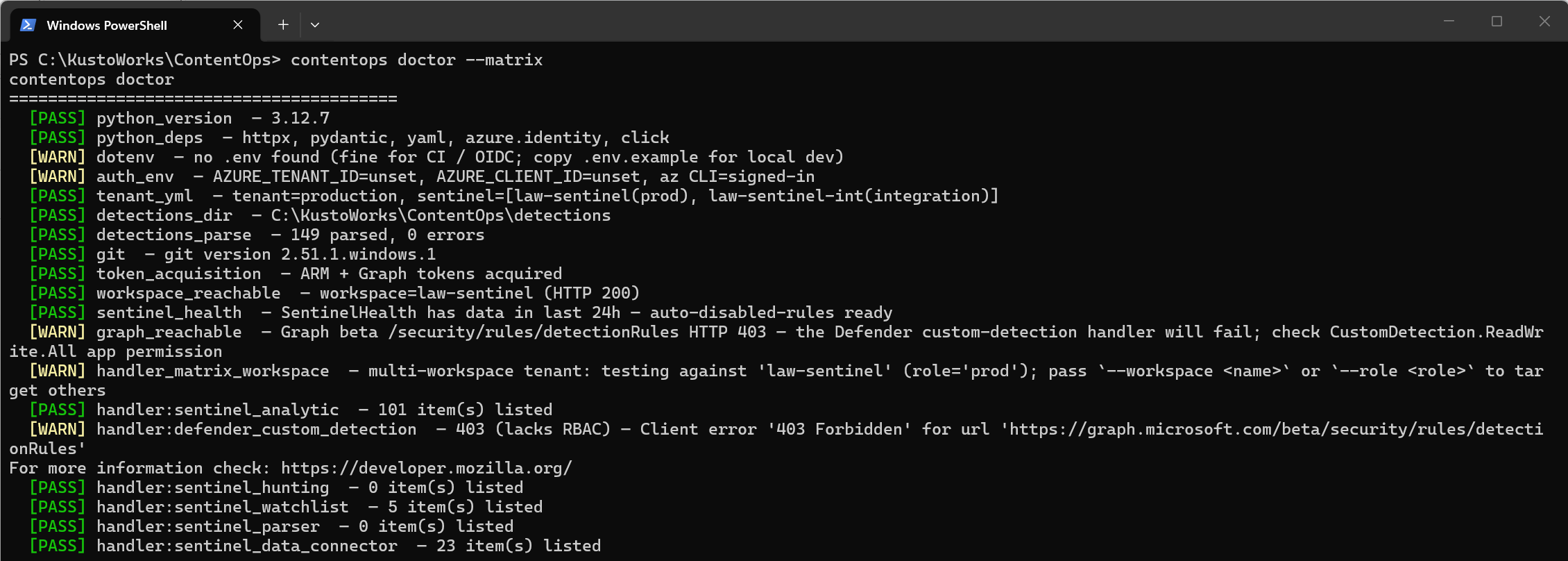 Microsoft Sentinel is fully wired. The Microsoft Defender XDR 403 shows exactly what to fix before the first deploy.
doctor validates the Python environment, parses the detections directory for schema errors, acquires ARM and Graph tokens and checks workspace reachability. --matrix runs a list operation against every asset kind so we see exactly which handlers are wired.
The screenshot above is from a mid-setup run. Microsoft Sentinel is fully operational but the Microsoft Defender XDR handler returns 403 because CustomDetection.ReadWrite.All has not been admin-consented yet. That WARN tells us exactly what to fix. Nothing in the tenant has been touched.
Once doctor is clean, we run conformance, the CI equivalent. It covers the same ground but runs as a GitHub Actions workflow, so it also validates that the repo, environments and federated credentials are wired correctly end to end. We can trigger it locally or via CI:
1
2
contentops conformance                              # local, requires toolchain
gh workflow run conformance.yml --ref main          # triggers the CI job
The L1–L7 layers cover, in order: local install, tenant config, token acquisition via DefaultAzureCredential (azure/login/OIDC in CI, az login or .env locally), Graph permissions, Azure RBAC, functional reachability and GitHub wiring. Layers that do not apply (e.g. Microsoft Defender XDR when disabled) report SKIP, not fail.
The scheduled conformance.yml run uses a matrix: the automation leg runs L1–L6 and the conformance leg runs all layers. Both upload separate conformance artifacts. With identity_mode: single, both legs use the same App Registration. The report labels the automation leg identity=read (single-app) and adjusts expectations accordingly. L7 (branch protection inspection) may SKIP on private repos if GITHUB_TOKEN does not have the administration scope. We want all layers PASS or SKIP before we touch deploy.
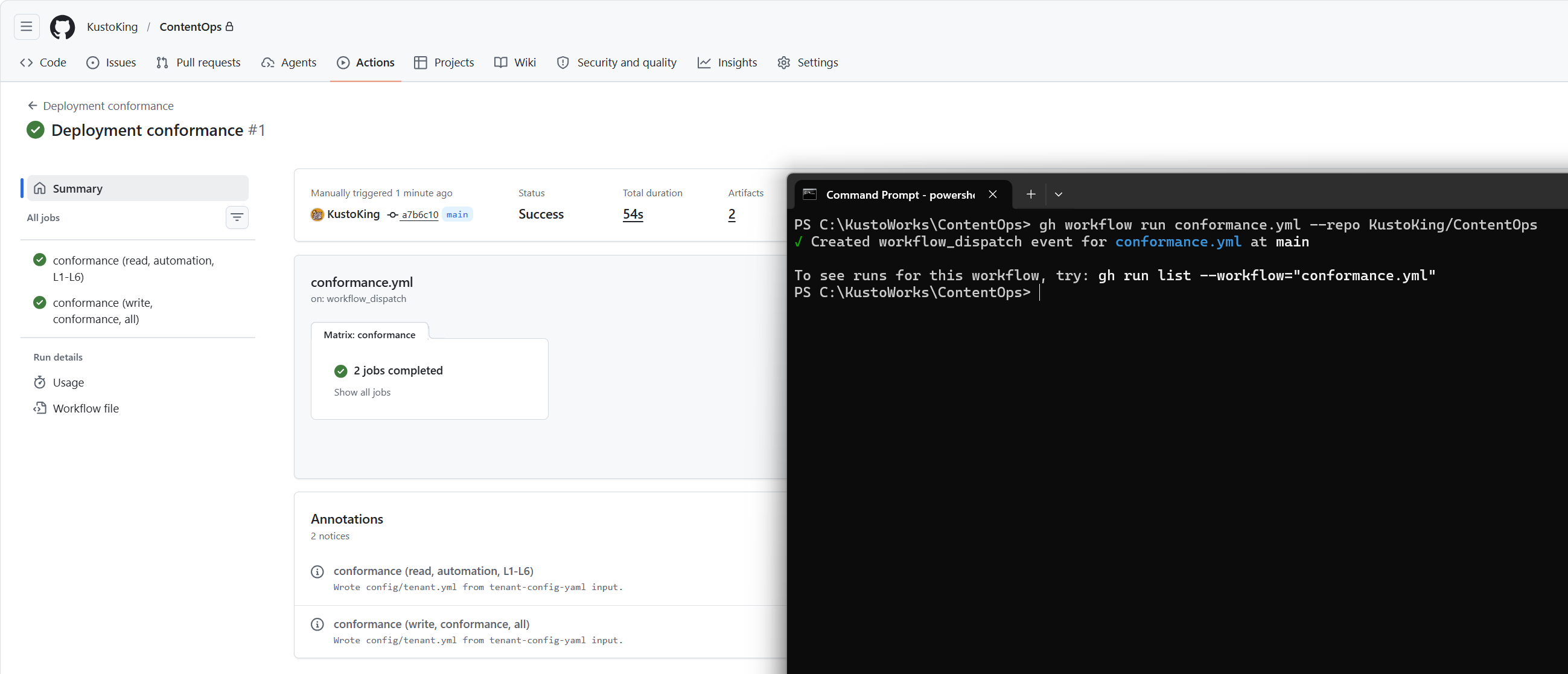 All layers PASS or SKIP. Auth, RBAC and permissions are wired correctly.
Collect, review, deploy
The four workflows that make up the core detection lifecycle:
| File | Function | Trigger |
|---|---|---|
validate.yml | PR gate: strict lint, checks and local plan preview | Auto on PR touching detections/ |
conformance.yml | L1–L7 pre-flight check | Monday 05:00 UTC + manual |
collect.yml | Import existing tenant detections as YAML → PR | Monday 05:30 UTC + manual |
deploy.yml | Apply merged changes to the production workspace | On push to main + manual |
The first collect run is our baseline import: it snapshots whatever already exists in the tenant into detections/ and opens a PR. After we merge this baseline, we author new detections as YAML directly. collect.yml continues to run on its weekly Monday schedule as a full snapshot, complementing the daily drift.yml divergence check. Teams that do not want ongoing full snapshots can disable the collect.yml schedule in the workflow file after the baseline PR is merged.
1
2
3
gh workflow run collect.yml --ref main -f role=prod -f full=true
# full=true is the default and collects all asset kinds.
# Use -f full=false for analytics-only collection.
Watch the run in the Actions tab on GitHub, or with gh run watch.
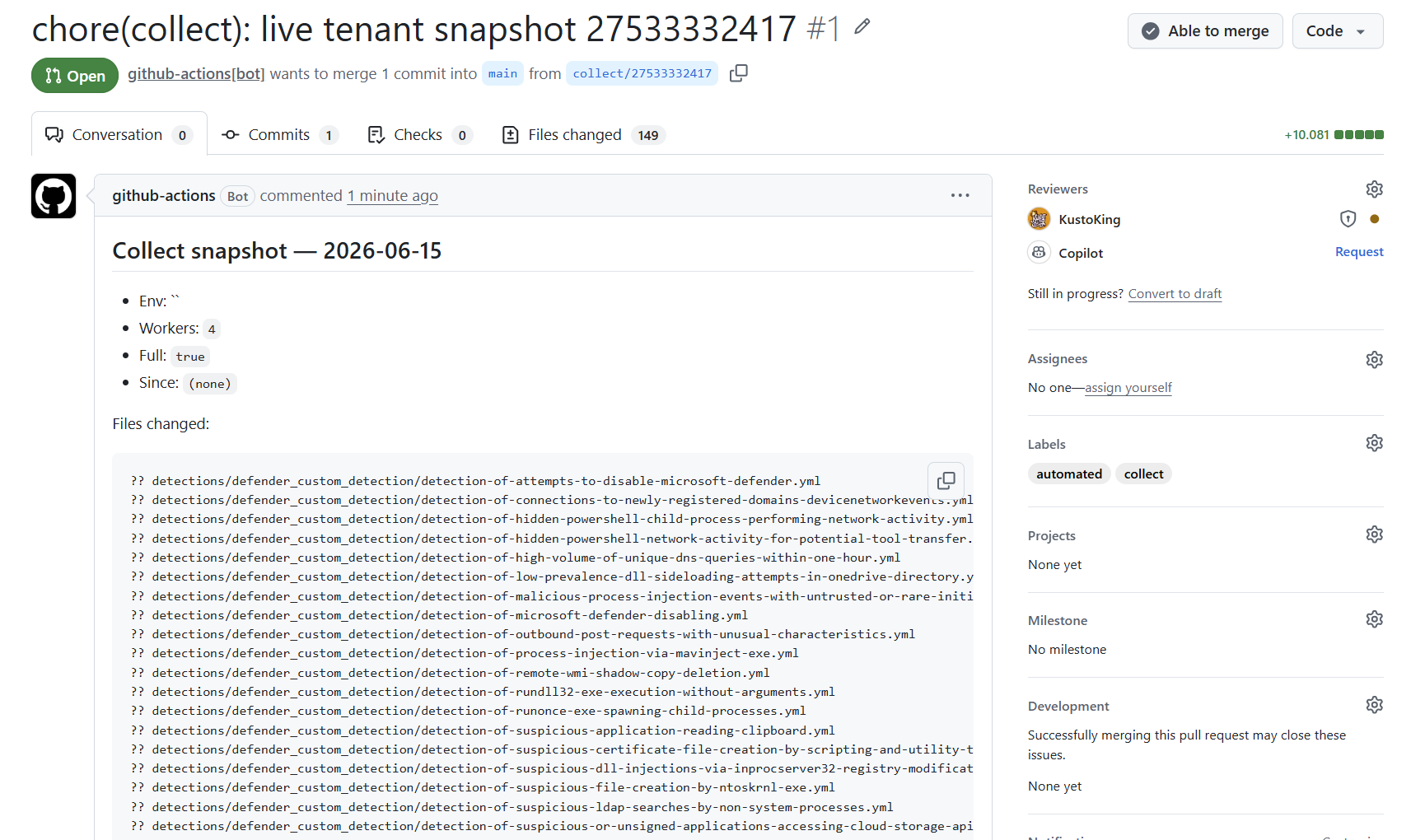 Existing detections imported as YAML, our starting baseline.
A fresh workspace with no existing detections returns 0 items. That is not an error. Merge the empty baseline PR and start authoring detections directly in
detections/<kind>/.
Every PR triggers validate: strict lint, schema parse, dependency checks, version-bump checks and reference URL checks, plus a local contentops plan that shows what the repo intends. This plan is a local projection. It does not connect to the tenant. Live tenant divergence is surfaced by drift.yml, which comments on detection PRs.
On merge to main, deploy applies the changed content to every prod-role workspace and to Microsoft Defender XDR, with a post-deploy smoke check and an audit record:
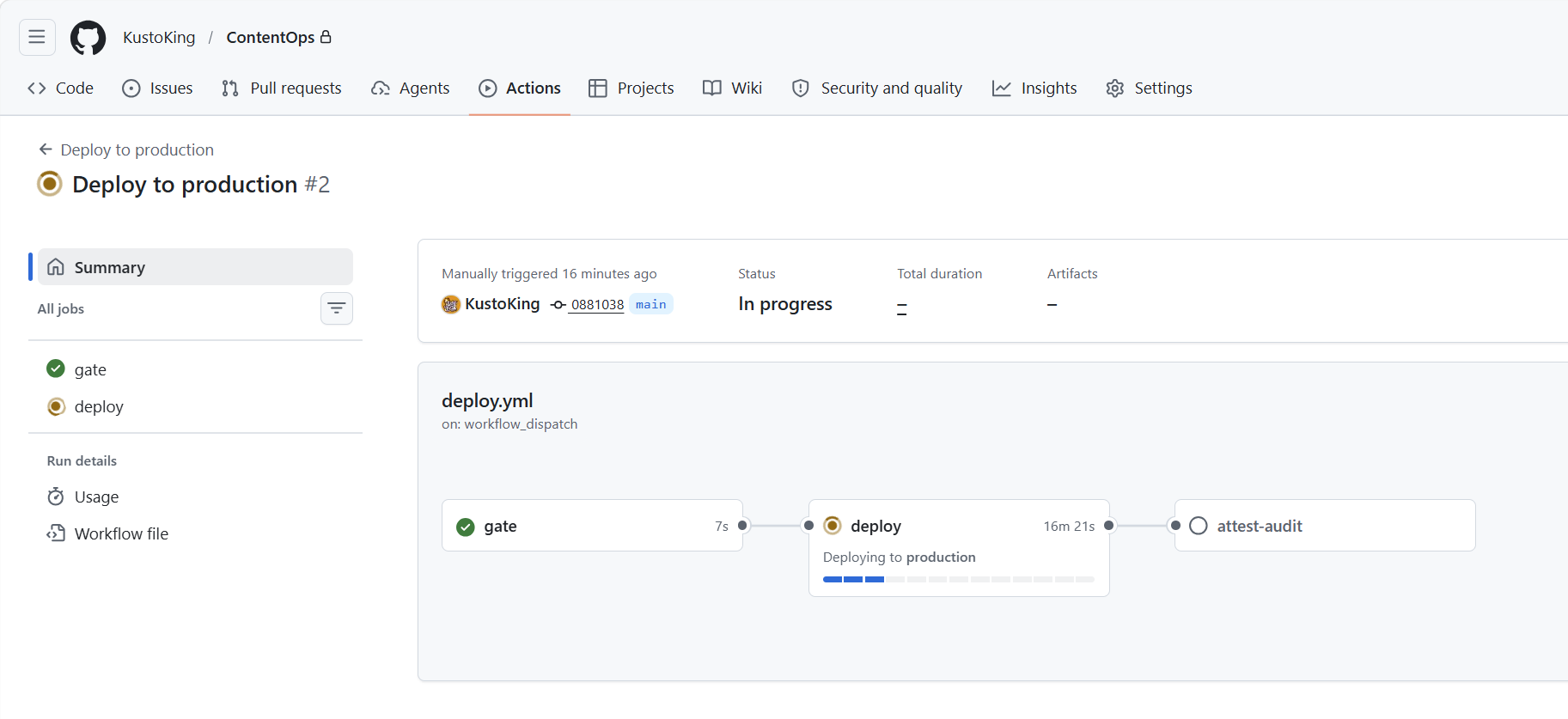
apply against prod, gated by the safeguard triple and recorded in the audit chain (artifact-retained, not committed to main).
If a deployed rule causes problems, we revert the YAML in a new PR and merge. The next deploy corrects the tenant to match the repo. For Microsoft Sentinel analytics, the previous version is always in git history.
At this point setup is complete. The configuration checklist at the end of this post summarises everything we have wired. What follows is the scheduled automation that keeps the estate honest.
Day-2: Operations
The scheduled automation that keeps the detection estate reconciled, audited and reported. No configuration is needed beyond what Day-1 wired.
The full workflow surface. Scheduled Azure-calling jobs run automatically once the matching environment has a federated credential. Reporting-only jobs (report.yml, coverage.yml) need only their GitHub environment and repository permissions. Seven internal CI workflows (ci, dco, sast, secret-scan, spelling, e2e-capability-tests, release) run automatically on every PR or push and require no configuration beyond the repo defaults.
Scheduled
| File | Function | Cadence |
|---|---|---|
kql-schemas-refresh.yml | Refresh table schemas from live workspace | Nightly 03:30 UTC |
status-refresh.yml | Refresh detection health and enabled state | Daily 04:00 UTC |
drift.yml | Tenant ↔ repo comparison, opens PR on divergence | Daily 06:00 UTC |
alerts-report.yml | Alert sync, rollup, health and TP/FP/MTTR report | Daily 07:00 UTC |
portfolio.yml | Per-detection portfolio CSV + JSON | Daily 07:30 UTC |
audit-verify.yml | Verify audit JSONL hash-chain integrity | Monday 04:00 UTC |
silent-rules.yml | Flag analytics with no hits in lookback window | Monday 07:00 UTC |
attack-matrix-refresh.yml | Pull latest MITRE ATT&CK STIX data | Weekly Tuesday |
defender-graph-probe.yml | Probe Defender Graph beta endpoints for GA changes | Weekly Tuesday |
references-check.yml | HEAD-check all references[] and runbookUrl URLs | Weekly |
upstream-watchers.yml | Poll Sentinel content catalog for new templates | Weekly |
report.yml | Commits dated MITRE-tagged detection inventory snapshot | Monday 08:00 UTC + push |
coverage.yml | Commits ATT&CK coverage layer and badge JSON | On push/PR |
Manual operations
| File | Function |
|---|---|
lock-unlock.yml | Lock or unlock an individual detection via PR |
retry-failed.yml | Retry transient ARM or Graph deploy failures |
prune.yml | Bulk delete orphans, guarded by purgeAllowed + maxDelete |
rollback.yml | Roll detection content back to a prior Git SHA |
emergency-disable.yml | Disable a single rule immediately, opens tracking PR |
Integration environment
| File | Function | Trigger |
|---|---|---|
production-promotion-check.yml | Production readiness gate | Auto on PR |
tuning-impact-preview.yml | PR comment: 30-day blast-radius for drift suppressions | Auto on PR |
integration-deploy.yml | Deploy detection PRs to integration workspace | Auto on detection PR + manual |
integration.yml | Full live integration test suite | Manual only |
promote-to-integration.yml | Snapshot production → apply to integration workspace | Manual only |
Drift detection
Drift is what makes the pipeline continuously reconciling rather than deploy-only.
Every time someone edits a rule directly in the Microsoft Sentinel portal, deletes an analytic via the API, or a tenant migration overwrites a field, the live tenant silently diverges from what the repo says should be there. Without drift detection, you would not know until something broke.
drift.yml runs daily at 06:00 UTC. It calls contentops drift, which reads every deployed detection from the live tenant and compares it field-by-field against the YAML in detections/. When anything diverges, it opens a pull request showing exactly what changed and where.
The PR is a decision point: if the portal edit was intentional, we accept it by committing the updated YAML and merging. If it was unauthorized or accidental, close the drift PR without merging. Note: deploy.yml automatically skips bot-generated commits from collect, drift and automation branches. To reconcile the tenant back to the repo state, trigger deploy.yml manually via workflow_dispatch, or wait for the next normal detection-change PR to merge and deploy.
That cycle of deploy, drift, review and reconcile is what prevents the detection estate from slowly diverging into an unauditable state.
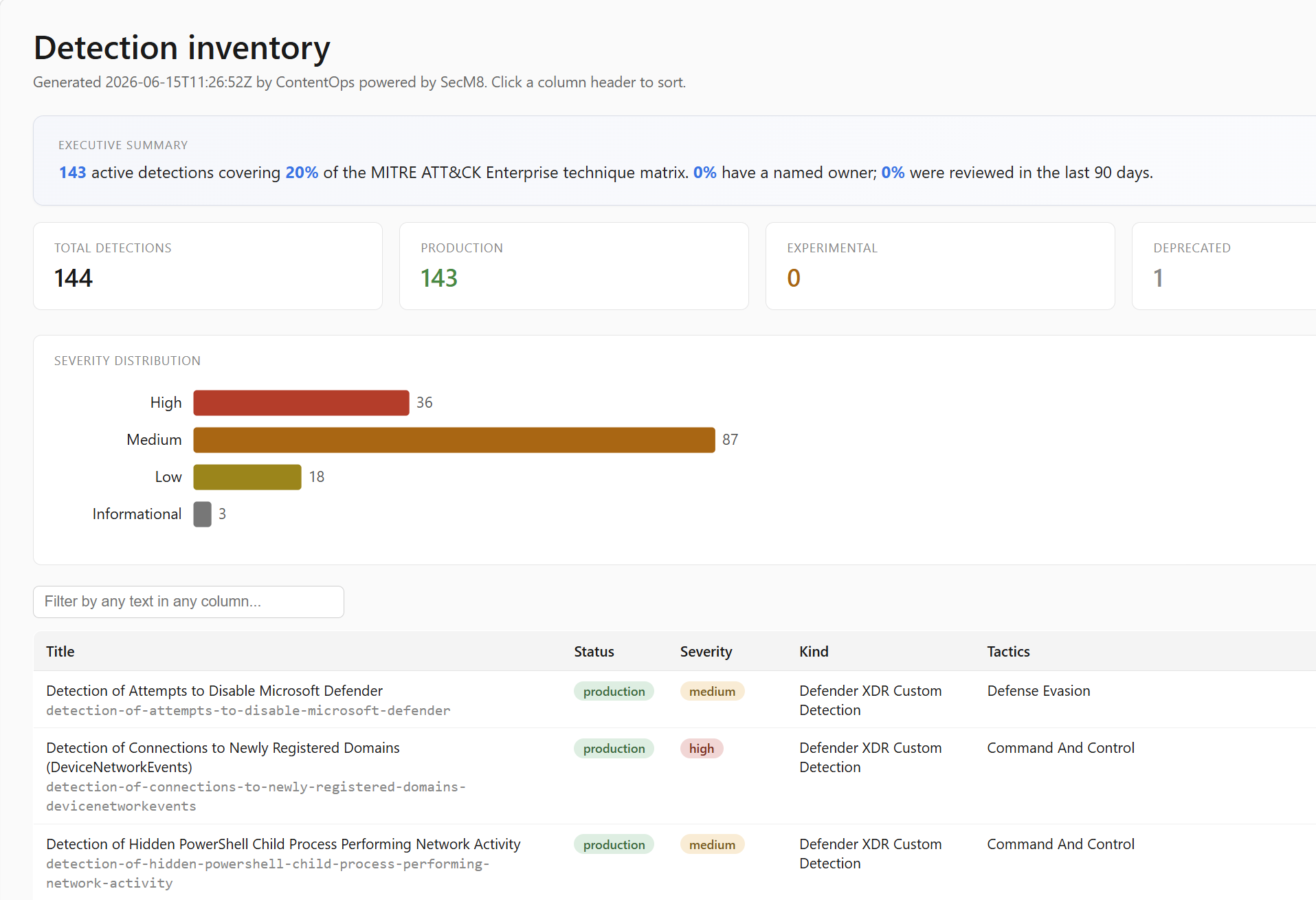 Versioned posture history, diffable week over week, bounded by your retention setting.
Keeping our private repo updated
The mirror is rebuilt nightly. We pull tool updates with a merge (never a rebase, which would mangle the sync history):
1
2
3
4
git fetch upstream
git switch main
git merge --signoff upstream/main
git push origin main
Our detections/<kind>/ and config/tenant.yml are untouched. The mirror never carries them. If the first merge reports refusing to merge unrelated histories, run the one-time stitch before adding local detections:
1
git merge --allow-unrelated-histories -X theirs --signoff upstream/main
Only use -X theirs before adding local detections or tenant-specific changes. After the first stitch, use normal signed merges.
Why this is safe
- Keyless: OIDC federation means no client secret to leak or rotate
- No tenant config in git:
tenant.ymlis gitignored. CI materialises it fromTENANT_CONFIG_YAML - Bounded blast radius: the
writeAllowed/purgeAllowed/maxDeletetriple gates every write and delete - CI gates on every PR: supply-chain checks (secret scanning, SAST, dependency review, workflow linting) must pass to merge
- Tamper-evident: applies are recorded in a tamper-evident hash-chained audit JSONL, uploaded as a workflow artifact (90-day default retention, not committed to main) and verified weekly by
audit-verify.yml - One-way mirror: an allowlist plus a forbidden-paths check keep detection content and operational telemetry out of the public mirror
Configuration checklist
- Repo cloned,
origin= your private repo,upstreampush DISABLED - App Registration created, Microsoft Sentinel Contributor + Log Analytics Contributor assigned on workspace
- Graph permissions admin-consented if managing Defender XDR custom detections
- Federated credential per Azure-calling environment (
repo:<org>/<repo>:environment:<env>) .contentops-conformance.ymlcreated withidentity_mode: single, subjects andgithub_repoupdated to your org/repoAZURE_TENANT_IDandAZURE_CLIENT_IDset as repository variablesTENANT_CONFIG_YAMLsecret holds the fulltenant.yml- “Allow GitHub Actions to create and approve pull requests” enabled
contentops config validatepassescontentops doctor --matrixis cleanconformanceis green (PASS/SKIP across L1–L7)- First
collectPR reviewed and merged - First
deploycompleted and audited drift.ymlscheduled. First run confirms repo matches tenant post-deploy
Final thoughts
ContentOps applies to detection content the same discipline we already use for code. The result is a detection estate that is reviewable, reproducible, continuously reconciled with the tenant and fully auditable. Configure it once and every rule change after that is a pull request, not a portal click.
If you try it, I would love feedback: missing asset kinds, rough setup edges, unclear docs or workflows you would want in your own SOC. Open an issue on GitHub or reach out on LinkedIn. Happy to help.